

Instructions for Course Self-Registration for Graduate Students
These instructions are for graduate students matriculating in a graduate program.
Follow the steps below to self-register for graduate courses
- Browse Classes (plan your schedule)
- From the WCSU Homepage, go to Essentials and click WolvesNet. Then, select Browse Classes.
- Search, review details (days/times, location, instructor), and note the CRN for each section you plan to take. The CRN (Course Reference Number) is the five-digit code you will use to register in Banner Web.
- Log in to DegreeWorks under Degree Progress in WolvesNet to review your academic progress and ensure that your planned courses meet your degree requirements.
- If you have questions regarding your course selection, seek help from your program coordinator.
- Seek Guidance from Your Program Coordinator
Before registering, seek guidance from your graduate program coordinator to:- Ensure your selected courses satisfy your degree requirements.
- Ensure your selected courses satisfy the prerequisite and sequence requirements.
- Discuss your course load (full-time or part-time) and resolve any potential registration holds.
- Once your course selections are confirmed, proceed to register in Banner Web.
- If your enrollment status is changing from part-time to full-time status, contact the graduate admissions office before registering.
- Before starting the registration:
- Confirm that you meet the course prerequisites. If you are uncertain, consult your graduate program coordinator for guidance. If a prerequisite override is required, please contact the chair of the department offering the course to initiate and process the override request.
- Confirm that you have no holds.
- Confirm that the course section is open (seats available).
- Try clearing your browser cache or switching to a different browser if pages do not load correctly.
- Register for Your Planned Courses (using CRNs)
- In WolvesNet, click Register for Classes
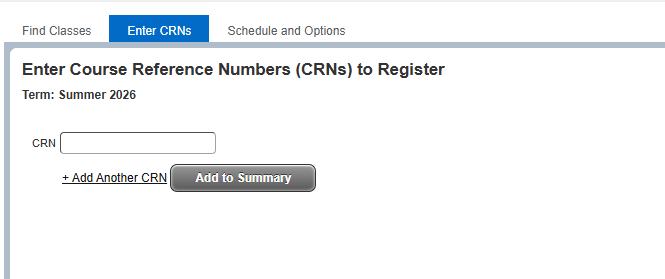
- Click on Register for Classes – Then Enter CRNs
- Add the classes to the summary – then submit on the next page
- Submit your registration
- A status of “Registered” confirms your registration was successful. If there is an issue, an error message will appear on the screen.

- Review your final schedule and ensure that everything is accurate.
- Additional Support Needed:
Depending on the type of issue you are encountering, please contact the appropriate office:- Academic Advising and Course Selection: Contact your Program Coordinator for guidance on degree requirements, course sequencing, and academic concerns.
- Financial or Billing Matters: Contact the Cashier’s Office [cashiers@wcsu.edu] for questions regarding tuition, fees, or payments.
- Financial Aid and Scholarships: Contact the Office of Financial Aid [wcsufinancialaid@wcsu.edu] for assistance with loans, grants, and scholarships.
- Technical or Login Issues: Contact the IT Department [RequestIT@wcsu.edu] for help with WolvesNet, Banner Web, or account access.
- Other Registration or Graduate Student Issues: Contact the Office of Graduate Admissions [graduateadmissions@wcsu.edu].
- If, after seeking assistance from the relevant offices, your issue remains unresolved, please contact the Dean of the School of Graduate, International, and Career Studies for further support.